
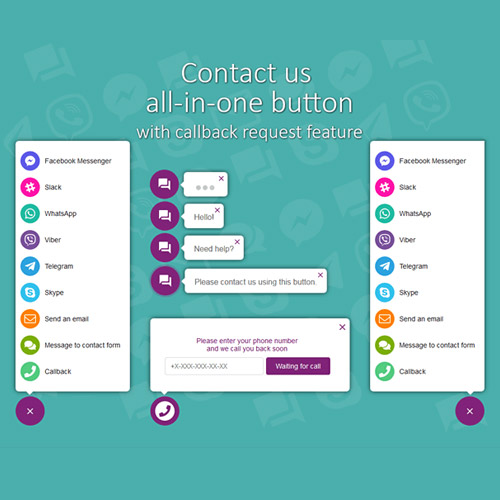


All in One Support Button + Callback Request. WhatsApp, Messenger, Telegram, LiveChat and more…
– Very cheap price & Original product !
– 100% Clean Files & Free From Virus
– Unlimited Domain Usage
– Free New Version
– Product Version : 2.2.7
– Product Last Updated : 17.12.2022
– License : GPL
License : GPL
Original price was: $69.99.$2.99Current price is: $2.99.
Description
All in One Support Button + Callback Request
All in One Support Button is a comprehensive WordPress plugin that consolidates multiple customer support channels into a single, user-friendly button on your website. It includes popular communication tools like WhatsApp, Messenger, Telegram, LiveChat, and callback request options to provide instant and versatile customer service.
🌟 Key Features of All in One Support Button
Multi-Channel Support: Integrate WhatsApp, Facebook Messenger, Telegram, LiveChat, and more in one button.
Callback Request: Visitors can request a callback by submitting their phone number directly from the site.
Customizable Button: Choose icons, colors, positions, and animations to match your website design.
Multiple Agents Support: Route chats and callback requests to different team members or departments.
Easy Setup: Simple configuration panel to add and manage all support channels without coding.
Mobile Friendly: Fully responsive and optimized for mobile devices for seamless user experience.
Analytics & Logs: Track user interactions and callback requests to improve customer service.
Popup & Chat Windows: Customizable chat windows for Messenger, Telegram, and LiveChat integration.
GDPR Compliance: Built-in consent management for privacy regulations.
Supports Multiple Languages: Compatible with WPML and other translation plugins.
📦 What’s Included
✅ All in One Support Button plugin files (.zip)
✅ Full access to callback request features
✅ Integration with WhatsApp, Messenger, Telegram, LiveChat, and more
✅ Customizable design and user experience options
✅ Detailed documentation and user guide
✅ Lifetime updates and support
⚙️ Installation & Usage
Download the all-in-one-support-button.zip plugin file.
Go to WordPress Dashboard → Plugins → Add New → Upload Plugin.
Upload, install, and activate the plugin.
Navigate to the plugin settings to connect your WhatsApp, Messenger, Telegram, LiveChat accounts.
Configure the callback request form and customize the support button appearance.
Add the support button to your site and start engaging with your visitors.
❓ Frequently Asked Questions
Can I use multiple support channels simultaneously? ✅ Yes, all channels can be integrated in one button.
Does it support mobile devices? ✅ Fully responsive and mobile-optimized.
Is the callback request feature customizable? ✅ Yes, you can customize fields and notifications.
Do I need coding skills to set up? ❌ No, setup is user-friendly with no coding required.
👨💻 About the Developer
This plugin is developed by a trusted WordPress plugin author specializing in customer support solutions, aiming to improve website-user communication efficiently and seamlessly.
Features
 Licence: GPL (General Public License)
 Updates: Free Lifetime Updates
 Installation: Easy to Install and Use
 Customization: 100% Customizable
 Access: Instant Download After Purchase
Recommended Products

Directorist Digital Marketplace
Original price was: $69.99.$2.99Current price is: $2.99.
Gravity Forms Signature Addon
Original price was: $69.99.$2.99Current price is: $2.99.
Garage Master – Garage Management System
Original price was: $69.99.$2.99Current price is: $2.99.
Gonzales WordPress Plugin
Original price was: $69.99.$2.99Current price is: $2.99.
FacetWP – Bookings Integration
Original price was: $69.90.$2.99Current price is: $2.99.
WP Rich Snippets WooCommerce Reviews
Original price was: $69.99.$2.99Current price is: $2.99.
YITH Quick Order Forms for WooCommerce Premium
Original price was: $69.99.$2.99Current price is: $2.99.
Odio – Music WP Theme For Bands, Clubs, and Musicians
Original price was: $69.99.$2.99Current price is: $2.99.
Farm Agrico | Agricultural Business & Organic Food WordPress Theme
Original price was: $69.99.$2.99Current price is: $2.99.
ForGravity – Entry Automation Amazon S3 Extension
Original price was: $69.90.$2.99Current price is: $2.99.More Like This